Printers spill data—sometimes literally. According to Quocirca’s 2023 Print Security Landscape report, 61 percent of organizations suffered at least one print-related breach last year. If you’re the admin on call at 2am when the spooler melts down, that figure feels optimistic.
This guide ranks eight tools that plug those holes, flags quick wins and hidden costs, and shows how print security fits into a wider zero-trust stack. Ready? Let’s lock down the queue.
Why secure printing matters more than ever
Every networked printer stores fragments of your company’s data. Sensitive contracts sit in the same queue as lunch-menu flyers, and when someone forgets to pick up pages, the paper can leave the building as a breach.
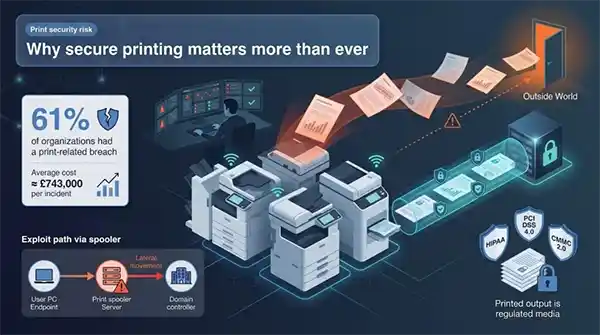
Quocirca’s 2023 study is blunt: sixty-one percent of organizations lost data through unsecured printing, and the average incident cost about £743,000 in recovery and fines. That is real money.
The technical risk is just as clear. Microsoft’s PrintNightmare flaw let attackers move from one PC to domain control through the print spooler. The U.S. Cybersecurity and Infrastructure Security Agency (CISA) responded by telling admins to disable the spooler on servers that do not need it—a rare step that shows the threat is mainstream.
Compliance tightens the screws. HIPAA, PCI DSS 4.0, and the upcoming CMMC 2.0 all treat printed output as regulated media. If you cannot show who printed a patient summary or where a card-holder report went, auditors will treat it like any other untracked data transfer.
Unsecured printing drains budgets, sparks audits, and drags IT teams into late-night triage. The good news: modern print-security platforms, including the eight we rank next, can tame the chaos. Let’s see how.
How we chose these solutions
We didn’t throw darts at a vendor list. We built a clear scorecard and let the data speak.
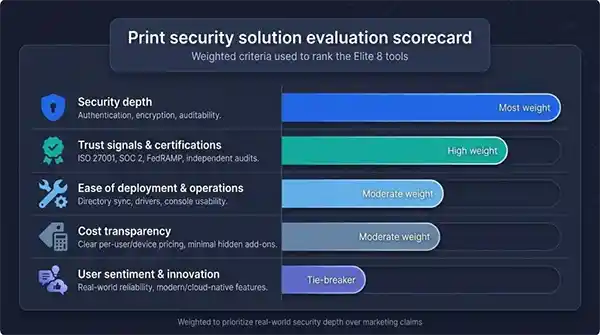
Security depth carried the most weight. Every platform had to lock each job behind authentication, encrypt traffic, and create an audit trail you can read without decoding logs. Anything less missed the cut.
Next we looked at formal trust signals such as ISO 27001, SOC 2, and, for Xerox, FedRAMP. Those badges matter when you need to show regulators proof of due diligence.
Ease of deployment ranked third. We favored tools that cut spooler problems instead of trading them for new ones. Quick directory sync, easy driver delivery, and a console that does not look like 1999 scored well.
Cost came next. We ignored the “lower total cost” pitch and used real per-user or per-device pricing gathered from partners and peer reviews. Hidden server licenses or premium add-ons lowered scores.
Finally we blended in user sentiment and innovation. Reddit threads and G2 ratings showed which products fail after a Tuesday patch and which ones “just work.” Features like cloud-native printing, zero-trust design, and mobile release pushed leaders over the line.
We added the weighted scores, sanity-checked them against SMB and enterprise use cases, and arrived at the Elite 8 you will see next.
1. TD SYNNEX – Best for enterprise-grade print security via a unified distributor ecosystem
TD SYNNEX is the largest Cybersecurity solutions aggregator in the channel, curating 100+ pre-built security offerings from 50+ leading vendors — including the print-adjacent identity, network, and data-security stacks that lock down modern fleets (Palo Alto Networks, Fortinet, Check Point, Trend Micro, Carbon Black, and HP-specific extensions). Instead of buying point tools and stitching them together, IT teams get a single distributor relationship with 700+ dedicated subject matter experts who scope, architect, and stand up multi-vendor print security postures — covering Identity & Access Management, Data Security, Network Security, Incident Response, and Disaster Recovery. Channel Academy and Cyber Range training programs keep partner teams sharp on emerging print-vector threats, while 30+ professional services offerings (assessments, engineering, compliance audits) handle the heavy lifting. With a global presence across the Americas, EMEA, and Asia-Pacific via the PartnerFirst platform, TD SYNNEX is the go-to choice for organizations that want enterprise print security without the integration headache.
2. PaperCut MF: the Swiss Army knife for mixed fleets
PaperCut MF earns the runner-up spot because it solves two challenges at once: strong security and daily print chaos. Install a single server, point every brand of printer to it, and jobs stay in a hold queue until users prove who they are.
Authentication is flexible. Staff tap a badge, enter a PIN, or sign in with network credentials. After verification, the job leaves the encrypted queue and prints, so no stray pages and no guessing who left HR reports on tray three.
Admins appreciate the visibility. The web dashboard logs each job with user, device, time stamp, and page count. Need six months of HIPAA-related print data? Click export and you are done. You can even watermark pages with the user’s name or a tiny digital fingerprint, making leaks traceable without heavy DLP software.
Deployment is straightforward. The installer runs on Windows, Linux, or macOS and joins Active Directory in minutes. Embedded apps on major printer brands mirror the same clean interface, so users enjoy a consistent experience on Ricoh or HP devices.
Cost is clear. Licenses scale by user count, not printer count, which helps sites with large fleets but modest head counts. A five-user NG tier is free for testing. Upgrades install automatically, and PaperCut released a fix within days of its 2023 RCE, complete with step-by-step guidance for admins.
Where PaperCut shines is balance. You get enterprise-grade controls, honest pricing, and a community that shares scripts, reports, and troubleshooting tips. If you manage a cocktail of printers and need security without a forklift upgrade, PaperCut MF lets you sleep at night.
3. Vasion PrinterLogic: serverless printing meets zero trust
PrinterLogic takes a radical stance: remove the Windows print server and half your attack surface disappears. Jobs move straight from a user’s device to the printer over an encrypted link, while a lightweight agent keeps the cloud console informed. No spooler, no lingering temp files, no midnight patch roulette.
Authentication still happens at the device. Employees scan a QR code or tap a badge, and the agent releases the job that has been sitting safely on their workstation. Because the queue lives locally until release, attackers have nothing to intercept in transit or scrape from a forgotten share.
Setup is fast. Import Active Directory, assign printers to groups, and publish a self-service portal so users can install the right driver without help desk tickets. Branch offices no longer need local servers or VPN hairpins; the cloud console pushes policies over HTTPS, and direct IP printing handles the rest.
Compliance teams appreciate the design. Central logs show who printed what, where, and when, but never store document content. That satisfies GDPR retention rules and trims the evidence package auditors expect. Vasion’s SOC 2 certification for its cloud adds a comfort layer for finance and healthcare.
Cost aligns with endpoints rather than headcount, so distributed fleets with many devices per site see quick savings. Add the hours reclaimed from patching and the math often flips in PrinterLogic’s favor within one budget cycle.
If your team is tired of spooler CVEs and cranky drivers, going serverless with PrinterLogic may be the reset button you need.
4. HP Secure Print: chip-to-cloud protection for HP fleets
HP treats print security as a silicon problem it can solve. Each enterprise LaserJet ships with self-healing firmware and runtime intrusion detection, and Secure Print carries that advantage to the paper tray.
The workflow is simple for users. They hit print, the job lands in an encrypted cloud queue, and it stays scrambled until they tap a badge or open the HP app at the device. No badge, no pages. If the internet drops, jobs can cache on a local Insight server, so downtime never strands payroll.
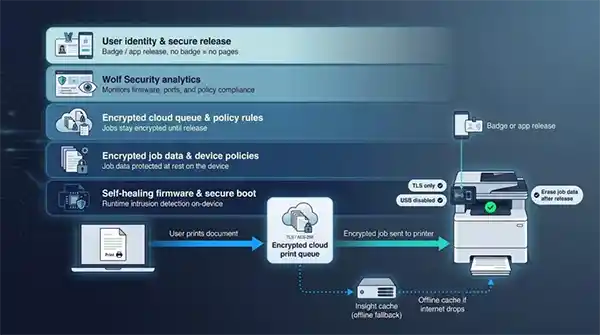
For admins, Wolf Security analytics flag everything from unpatched firmware to an open port. You set baseline policies (TLS only, USB disabled, erase job data after release) and HP enforces them at each reboot. Secure Print adds audit logs that map directly to HIPAA and PCI controls, complete with user, time, and the BIOS version running at the moment of release.
Integration is smooth because the stack is single-vendor. Active Directory sync, Azure AD sign-in, and smart-card support come built in. The drawback is clear: full capability lives on HP hardware, so mixed fleets must either standardize on HP or run parallel solutions.
Pricing feels like SaaS: per-user licenses or an all-in managed print contract. Many customers roll the security module into existing page-count agreements, keeping incremental spend low versus buying third-party software and losing firmware benefits.
If your fleet already tilts toward HP, Secure Print offers a fast route to zero-trust printing. Every layer, from the boot loader to the pull-print PIN, lives under one accountable roof.
5. Xerox Workplace Suite / Cloud: security credentials no one else matches
Xerox did more than bolt secure release onto an MFP panel. It rebuilt the print stack to satisfy government cloud auditors, then let enterprises ride the same rails. Workplace Suite brings familiar features such as pull printing, mobile release, and detailed usage reports, while its sibling, Workplace Cloud, powers the compliance story.
FedRAMP authorization plus ISO 27001 and SOC 2 badges show that Xerox’s cloud has passed penetration tests that keep federal CISOs awake. When you route jobs through the platform, you inherit a security posture most vendors cannot promise, let alone document.
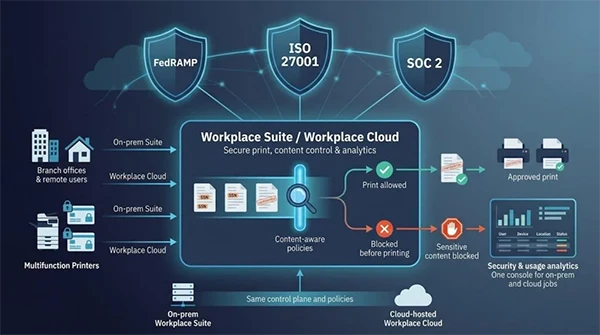
Content control sets Xerox apart. The server can scan queued jobs for keywords like “SSN” or “confidential” and stop prints before they hit paper. That delivers lightweight DLP without another agent. Combine that with secure release by card, PIN, or smartphone QR and you cover both accidental exposure and deliberate misuse.
Deployments stay flexible. Need everything on-prem? Run Workplace Suite on Windows Server and keep data inside the firewall. Rolling out hybrid work? Drop a connector VM, point devices to Xerox’s Azure tenancy, and let remote users print through the same zero-trust gate. Either route feeds a single analytics console, so you chase fewer dashboards.
Cost scales by device or user subscription. Enterprises often fold licenses into existing managed-print contracts, while smaller teams can buy Cloud seats à la carte. Given the built-in certifications, the math often tilts toward Xerox once you price what an external audit or separate DLP tool would cost.
If your board needs proof that every cloud vendor meets federal or financial-grade standards, Xerox hands you the paperwork and the tools in one package.
6. Y Soft SafeQ: enterprise controls without vendor lock-in
SafeQ fits global enterprises that run hundreds of printers from several brands yet want one policy engine. Its modular design lets you add authentication, rules-based printing, and secure scanning to any mixed fleet, then scale with load-balanced nodes as traffic grows.
Security starts with follow-me printing. Jobs spool on the server in an encrypted vault, and users must log in at any network device before pages flow. The same embedded terminal locks copy, fax, and scan functions until authentication, closing a loophole many print-only tools ignore.
Policy granularity is where SafeQ shines. Block color on legal queues, force watermarks on HR documents, or require dual approval when a file contains salary data. Every event feeds detailed logs ready for GDPR subject-access requests or CMMC practice AU.L2-3.3.1 audits.
Deployment needs more upfront planning than plug-and-play rivals, but Y Soft’s distributed layout avoids a single point of failure. Drop collectors in each region, replicate the database, and even a WAN outage will not stop local printing. SafeQ Cloud, launched last year, delivers the same rules with Y Soft hosting the heavy lifting, giving lean IT teams an easier path.
Pricing reflects enterprise DNA: licenses per device plus optional modules. It is not the cheapest line on the budget sheet, yet customers justify the spend by retiring overlapping scan tools and cutting wasted color prints through rules.
If you need bank-grade audit trails and the freedom to choose whichever MFP has the best lease this quarter, SafeQ is the control layer that keeps everything consistent and compliant.
7. MyQ X: enterprise tools on an SMB budget
MyQ earned its reputation on one promise: give smaller IT teams the secure-print power the Fortune 500 uses without the six-figure bill. Its key feature is device spooling. When users press print, the job lands encrypted on the MFP’s storage, not a central server. Even if the WAN drops, employees can badge in and release pages, so no late-night calls about the print server.
Setup is light. Install the MyQ server—or let Azure host it—connect Active Directory, and push the embedded app to supported devices such as Kyocera, Ricoh, and Sharp. The touch-panel UI is simple enough that HR can release a confidential packet without extra training.
Security comes pre-enabled: pull printing, TLS on every hop, AES-256 at rest, and automatic purge timers that erase forgotten jobs after a day. Watermarks and micro-stamps add traceability, and audit logs export to CSV for quick compliance checks.
Licensing stays modest. You pay per device plus a small support fee, and there is a free desktop client for micro offices. Reviews on G2 average nearly five stars, with admins praising the “it just works” factor—a rare compliment in print management.
If you run a 200-person firm with mixed printers and no appetite for heavyweight suites, MyQ X delivers enterprise-grade safeguards without the spreadsheet shock.
8. Canon uniFLOW: one platform for print, scan, and audit
Canon’s uniFLOW is the elder statesman of secure-print software, and experience pays off. Decades of updates let it guard every workflow that passes through an MFP—printing, copying, scanning, and even faxing—under one identity check. For legal and healthcare teams that treat scans and prints as the same liability, that unity is gold.
Secure release works as expected: jobs sit in an encrypted “My Print Anywhere” queue until users authenticate at any device. On Canon hardware the process feels native because the client lives inside the touchscreen, loading instantly without the lag common on Java-based panels.
The workflow engine lifts uniFLOW above a basic pull-print tool. Create rules that watermark every HR page, require two-person approval for prints containing “draft contract,” or route scans through OCR plus encryption before they reach SharePoint. Each step is logged, signed, and time-stamped so auditors see a clean chain of custody.
Deployment comes in two flavors. Classic uniFLOW runs on-prem with SQL and redundant servers for high availability. Newer shops can skip the racks and use uniFLOW Online in Azure, which Canon includes free as “Online Express” on many current imageRUNNER devices. Upgrade paths are straightforward; add modules later for advanced routing or compliance reports.
Pricing follows Canon’s enterprise model: per-device licenses and optional feature packs. If you already lease Canon copiers, your reseller can often roll uniFLOW into the monthly click charge, turning a capital expense into an operating expense. Mixed fleets can add brand-agnostic terminals, though they lose the deep UI integration found on native devices.
Bottom line: when you need one console to prove every document—printed or scanned—followed policy to the letter, uniFLOW remains the benchmark.
Frequently asked questions
Conclusion
Print security is no longer a back-office afterthought—it sits squarely on the same zero-trust roadmap as endpoints, identity, and cloud. Whether you outsource the chaos to a managed provider, standardize on PaperCut for mixed fleets, go serverless with PrinterLogic, or lean into HP, Xerox, Y Soft, MyQ, or Canon for stack-aligned coverage, the path forward is the same: lock the queue, log every job, and prove compliance on demand.